
Final grades can be submitted to MyKU from the D2L gradebook. This method allows either the Calculated Final Grade or Adjusted Final Grade for each student to be submitted.
Preparing the Gradebook
To export grades to MyKU, final grades must be submitted using the Default KU Letter Grades. This scheme can be applied to either the Final Calculated Grade or Adjusted Final Grade.
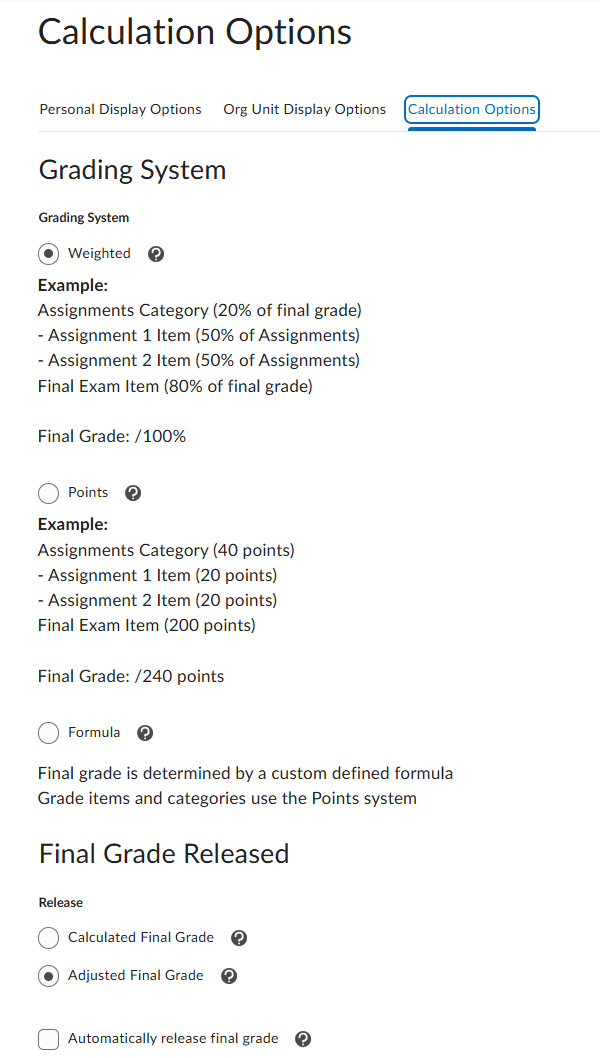
- To choose which grade is released to students and MyKU, navigate to Assessments>Grades and click Settings in the top right corner.
- Click on the Calculation Options tab at the top of the page.
- Scroll down to Final Grade Released and use the radial button to indicate which grade is released.
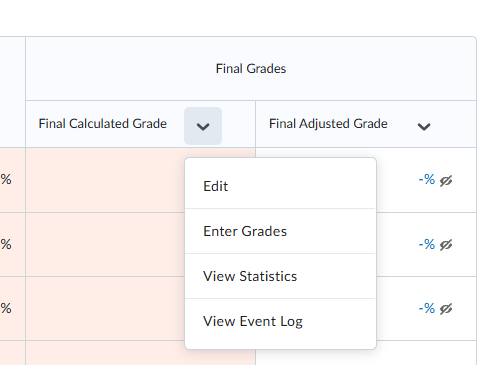
- To set the final grade column to use default Kutztown University letter grades, navigate to the gradebook and click the arrow next to the appropriate item (either Final Calculated Grade or Final Adjusted Grade). Click Edit.
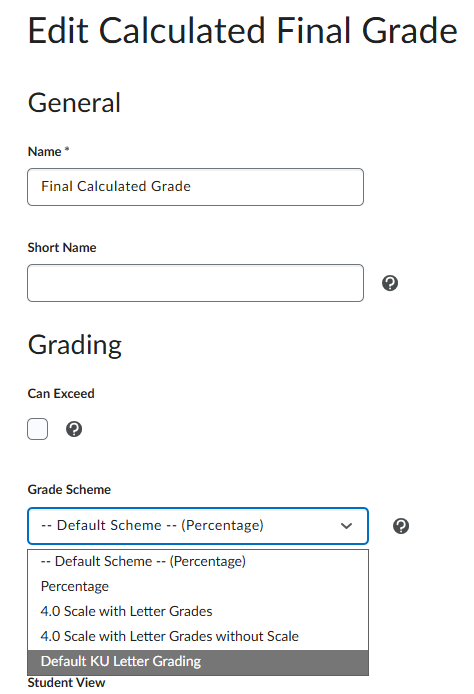
- Under Grading, use the dropdown for Grade Scheme to select Default KU Letter Grading.
- If using a different grade scheme, it is recommended to work with a copy of the default scheme to ensure the grade symbols (A, B, C+, etc.) are formatted correctly. Using any letter grades not part of the default scheme will result in errors.
- Review the released grade column before continuing to export the grades to MyKU.
- Note: it is not necessary to release or publish grades to students when submitting to MyKU.
Submitting Grades
To export grades to MyKU, navigate to the gradebook and click on Export to SIS at the top of the page.

The grade export window shows all students in the classlist, along with columns for:
- Current Final Grade – pulled from the Gradebook.
- Override Grade – A field to enter a different letter grade for the student. This adjusted grade is not synced back to the D2L gradebook.
- Last Attendance Date – Not required for final grade export.
- Default Incomplete Grade – Not required for final grade export.
- Incomplete Extension Expiry Date – Not required for final grade export.
Use the checkboxes on the left side to select users (or the uppermost left checkbox to select all users) and click Export to begin the process. The page may reload several times. Once completed, the results of the export will be presented. Note any errors in the Status and History columns.
Errors
There are two primary sources of errors when exporting grades to MyKU. Note that the error descriptions in this interface are limited.
- The final grade entered was invalid. This interface only accepts default KU letter grades. The grading scheme can be found on the Kutztown University Policy Register. Entering anything other than these letter grade symbols (including percentages, point values, or improperly formattedrly-formatted letter grades) will result in an error.
- The student’s enrollment was invalid. This interface will only send grades for students who are registered for the course on MyKU. If there is a mismatch between the class roster on MyKU and the classlist in D2L, notify KU IT to have the issue resolved.